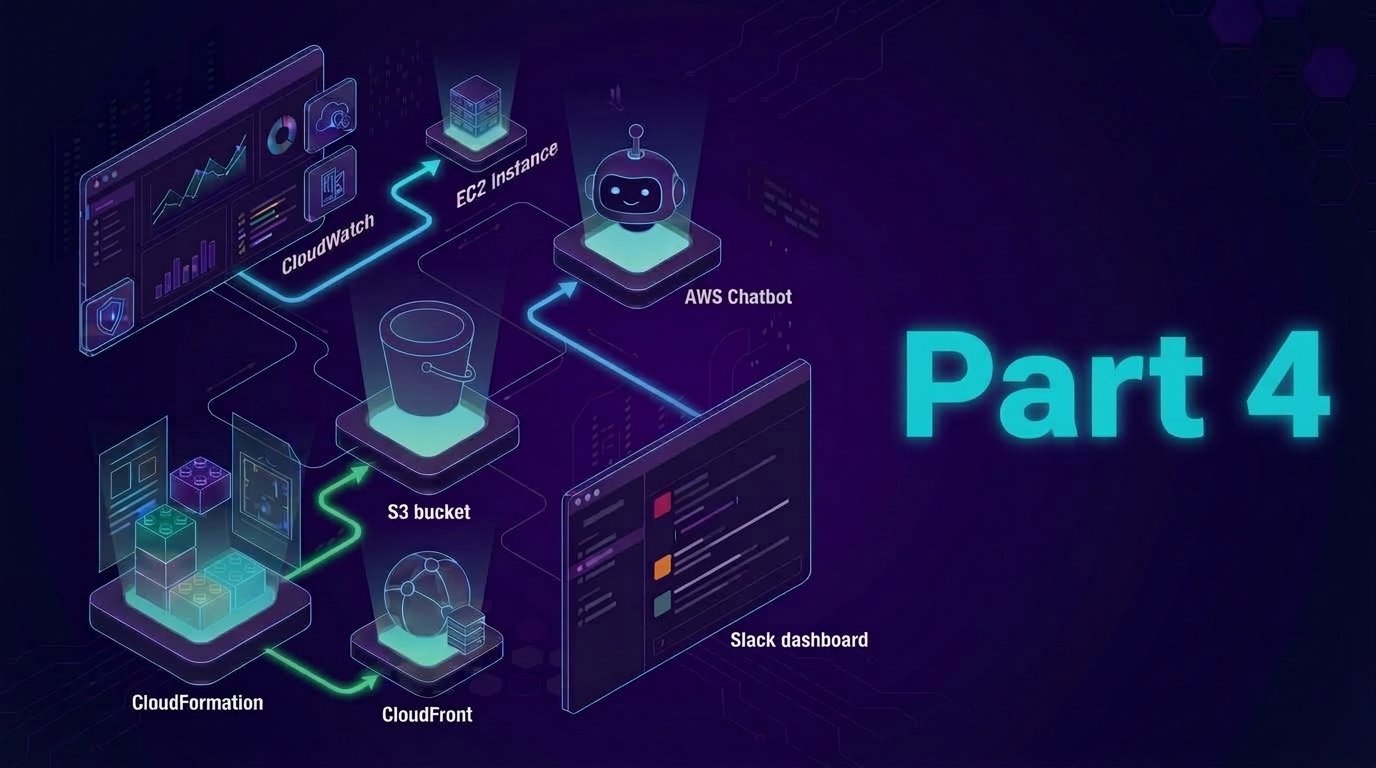
In this final part, we will build a monitoring dashboard for the Chat Support team which is already using the Slack workspace as part of the daily operation. CloudFront will be used as the Infrastructure as Code (IaC) which help the consistent setup with easy rollback and update.
The CloudFront template will provision the following:
- An S3 bucket configured for static website hosting
- A CloudFront distribution with Origin Access Control (OAC) for secure access
- A bucket policy that grants CloudFront access to the bucket only via the OAC
- An output URL to access the dashboard globally
Step 1: Create CloudFormation Template
Using our text editor / IDE, create a file using below code and save it with name dashboard.yml
AWSTemplateFormatVersion: '2010-09-09'
Description: ChatSupportBot – Frontend Dashboard (S3 + CloudFront using OAC)

Resources:

  DashboardBucket:
    Type: AWS::S3::Bucket
    Properties:
      BucketName: !Sub "chatsupport-frontend-${AWS::AccountId}-${AWS::Region}"
      WebsiteConfiguration:
        IndexDocument: index.html
      PublicAccessBlockConfiguration:
        BlockPublicAcls: true
        BlockPublicPolicy: true
        IgnorePublicAcls: true
        RestrictPublicBuckets: true
      OwnershipControls:
        Rules:
          - ObjectOwnership: BucketOwnerEnforced

  CloudFrontOAC:
    Type: AWS::CloudFront::OriginAccessControl
    Properties:
      OriginAccessControlConfig:
        Name: ChatSupportOAC
        Description: Access control for CloudFront to access S3
        SigningBehavior: always
        SigningProtocol: sigv4
        OriginAccessControlOriginType: s3

  DashboardDistribution:
    Type: AWS::CloudFront::Distribution
    Properties:
      DistributionConfig:
        Enabled: true
        DefaultRootObject: index.html
        Origins:
          - DomainName: !GetAtt DashboardBucket.RegionalDomainName
            Id: S3Origin
            S3OriginConfig: {}
            OriginAccessControlId: !Ref CloudFrontOAC
        DefaultCacheBehavior:
          TargetOriginId: S3Origin
          ViewerProtocolPolicy: redirect-to-https
          AllowedMethods: [GET, HEAD]
          CachedMethods: [GET, HEAD]
          Compress: true
          ForwardedValues:
            QueryString: false
        ViewerCertificate:
          CloudFrontDefaultCertificate: true

  BucketPolicy:
    Type: AWS::S3::BucketPolicy
    Properties:
      Bucket: !Ref DashboardBucket
      PolicyDocument:
        Version: "2012-10-17"
        Statement:
          - Effect: Allow
            Principal:
              Service: cloudfront.amazonaws.com
            Action: s3:GetObject
            Resource: !Sub "${DashboardBucket.Arn}/*"
            Condition:
              StringEquals:
                AWS:SourceArn: !Sub "arn:aws:cloudfront::${AWS::AccountId}:distribution/${DashboardDistribution}"

Outputs:
  DashboardURL:
    Description: CloudFront URL to access the frontend dashboard
    Value: !Sub "https://${DashboardDistribution.DomainName}"
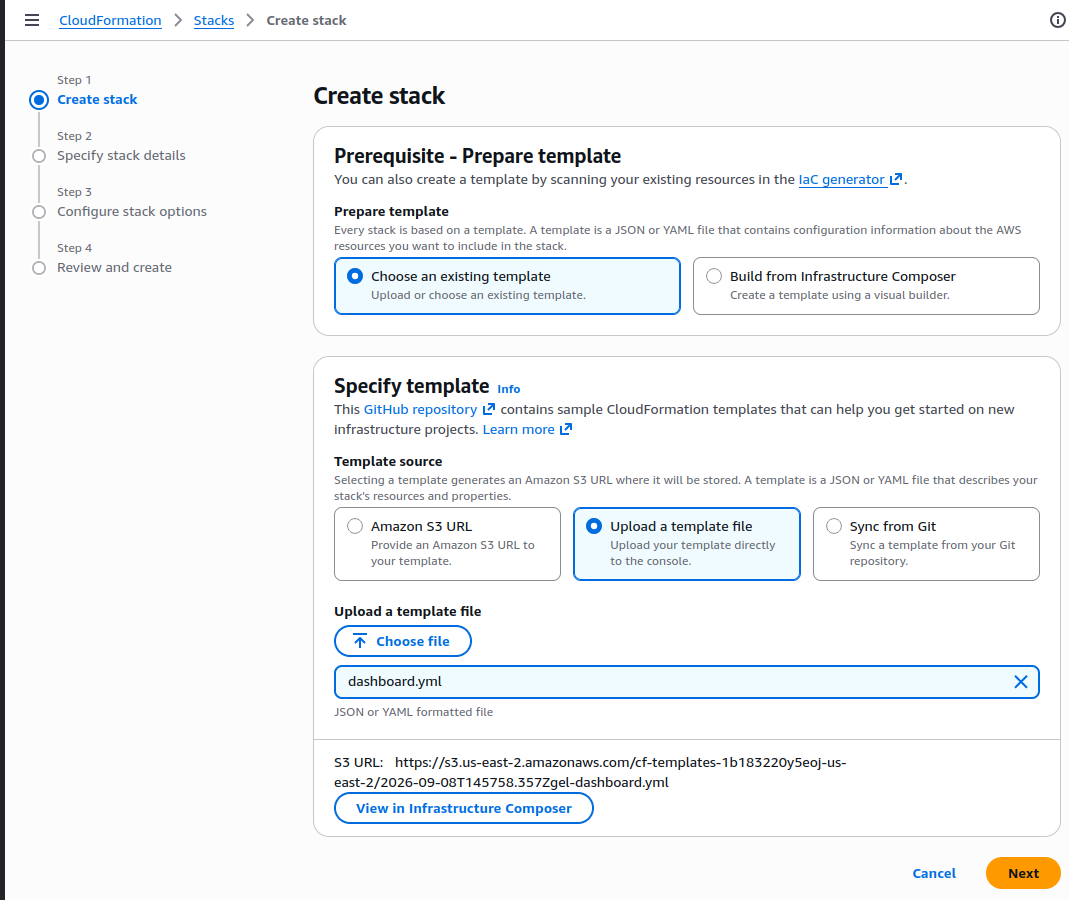
Step 2: Deploy the Code Using AWS CloudFront
- Visit CloudFormation in the AWS Console
- Click Create stack
- Under Prepare template
- Select:
Choose an existing template(default)
- Select:
- Under Specify template
- Template source: Select
Upload a template file - Upload: Click
Choose fileand select thedashboard.yml
- Template source: Select
- Under Prepare template
- Click Next
- Stack name: chatsupport-dashboard-stack
- Click Next
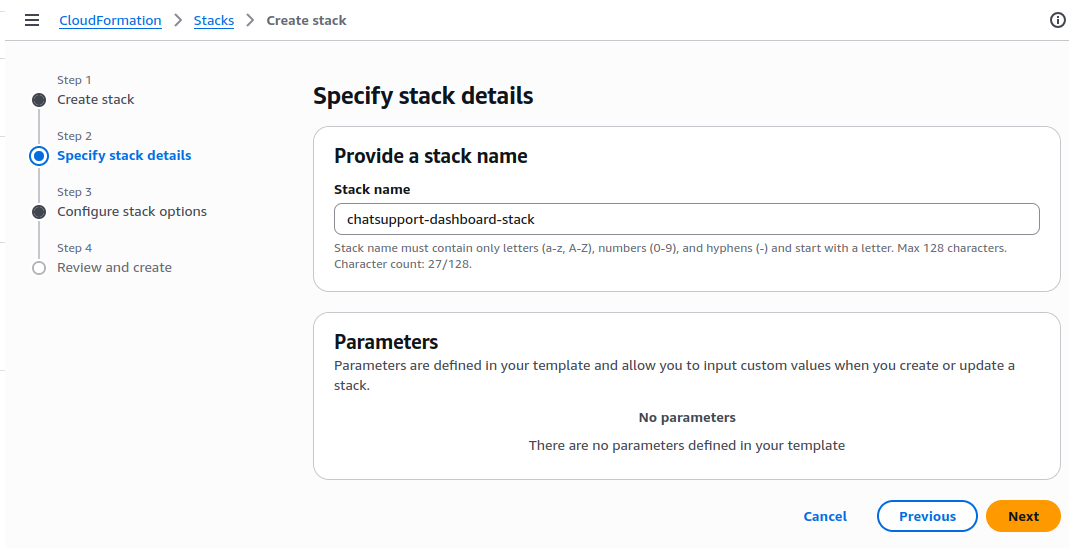
Leave all the stack configuration as default, review it, and click Submit / Create Stack
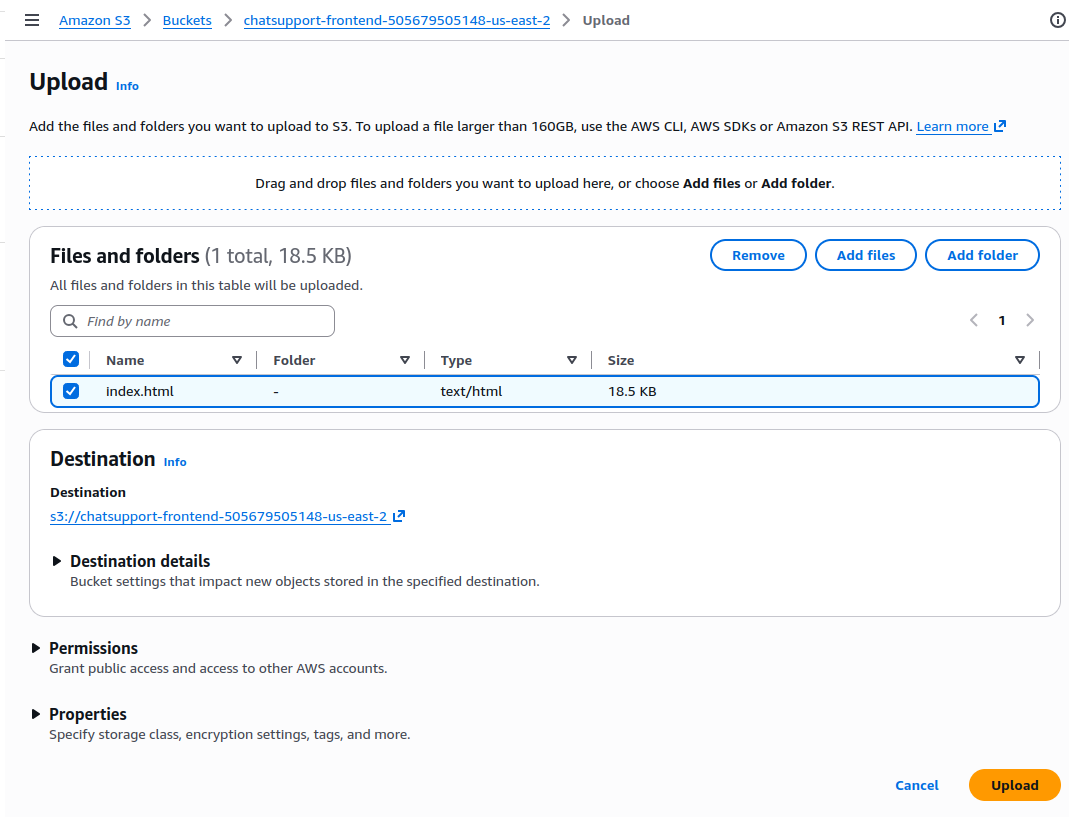
Step 3: Upload the HTML File to S3 Bucket
Visit S3 console and we can find the chatsupport-frontend S3 bucket has been created by CloudFormation
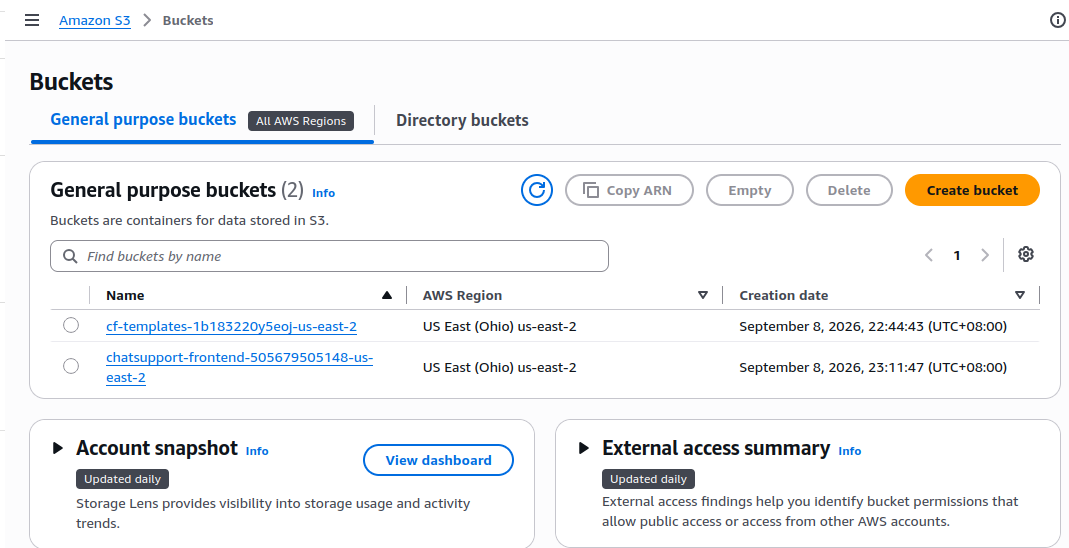
Use below HTML code snippet and save it as index.html on our local text editor
<!DOCTYPE html>
<html lang="en">
<head>
<meta charset="UTF-8">
<meta name="viewport" content="width=device-width, initial-scale=1.0">
<title>ChatSupportBot - AWS Operations Dashboard</title>
<style>
* {
margin: 0;
padding: 0;
box-sizing: border-box;
}
body {
font-family: 'Segoe UI', Tahoma, Geneva, Verdana, sans-serif;
background: linear-gradient(135deg, #1e3c72 0%, #2a5298 100%);
min-height: 100vh;
color: #333;
}
.container {
max-width: 1400px;
margin: 0 auto;
padding: 20px;
}
.header {
background: rgba(255, 255, 255, 0.95);
backdrop-filter: blur(10px);
border-radius: 20px;
padding: 30px;
margin-bottom: 30px;
box-shadow: 0 20px 40px rgba(0, 0, 0, 0.1);
border: 1px solid rgba(255, 255, 255, 0.2);
}
.header h1 {
font-size: 2.5rem;
background: linear-gradient(135deg, #667eea 0%, #764ba2 100%);
-webkit-background-clip: text;
-webkit-text-fill-color: transparent;
margin-bottom: 10px;
text-align: center;
}
.header p {
text-align: center;
font-size: 1.1rem;
color: #666;
max-width: 800px;
margin: 0 auto;
line-height: 1.6;
}
.stats-grid {
display: grid;
grid-template-columns: repeat(auto-fit, minmax(280px, 1fr));
gap: 25px;
margin-bottom: 30px;
}
.stat-card {
background: rgba(255, 255, 255, 0.95);
backdrop-filter: blur(10px);
border-radius: 20px;
padding: 25px;
text-align: center;
box-shadow: 0 15px 35px rgba(0, 0, 0, 0.1);
border: 1px solid rgba(255, 255, 255, 0.2);
transition: all 0.3s ease;
}
.stat-card:hover {
transform: translateY(-5px);
box-shadow: 0 25px 50px rgba(0, 0, 0, 0.2);
}
.stat-number {
font-size: 2.5rem;
font-weight: 700;
margin-bottom: 10px;
}
.stat-number.healthy { color: #27ae60; }
.stat-number.warning { color: #f39c12; }
.stat-number.critical { color: #e74c3c; }
.stat-number.info { color: #3498db; }
.stat-label {
font-size: 1rem;
color: #666;
font-weight: 500;
}
.main-grid {
display: grid;
grid-template-columns: 2fr 1fr;
gap: 30px;
margin-bottom: 30px;
}
.alerts-section, .actions-section, .services-section {
background: rgba(255, 255, 255, 0.95);
backdrop-filter: blur(10px);
border-radius: 20px;
padding: 30px;
box-shadow: 0 15px 35px rgba(0, 0, 0, 0.1);
border: 1px solid rgba(255, 255, 255, 0.2);
}
.section-title {
font-size: 1.5rem;
font-weight: 600;
margin-bottom: 20px;
color: #2c3e50;
display: flex;
align-items: center;
gap: 10px;
}
.alert {
background: #fff;
border-radius: 15px;
padding: 20px;
margin-bottom: 15px;
border-left: 4px solid;
box-shadow: 0 5px 15px rgba(0, 0, 0, 0.08);
transition: all 0.3s ease;
}
.alert:hover {
transform: translateX(5px);
box-shadow: 0 8px 25px rgba(0, 0, 0, 0.15);
}
.alert.critical { border-left-color: #e74c3c; }
.alert.warning { border-left-color: #f39c12; }
.alert.resolved { border-left-color: #27ae60; }
.alert-header {
display: flex;
justify-content: between;
align-items: center;
margin-bottom: 10px;
}
.alert-time {
font-size: 0.85rem;
color: #666;
background: #f8f9fa;
padding: 4px 12px;
border-radius: 20px;
}
.alert-type {
font-weight: 600;
font-size: 1rem;
}
.alert-detail {
color: #555;
font-size: 0.95rem;
margin-top: 8px;
}
.action-btn {
background: linear-gradient(135deg, #667eea 0%, #764ba2 100%);
color: white;
border: none;
padding: 12px 25px;
border-radius: 25px;
font-weight: 600;
cursor: pointer;
transition: all 0.3s ease;
margin: 5px;
font-size: 0.9rem;
}
.action-btn:hover {
transform: translateY(-2px);
box-shadow: 0 10px 20px rgba(102, 126, 234, 0.3);
}
.service-item {
display: flex;
justify-content: space-between;
align-items: center;
padding: 15px;
background: #fff;
border-radius: 12px;
margin-bottom: 12px;
box-shadow: 0 3px 10px rgba(0, 0, 0, 0.05);
}
.service-name {
font-weight: 600;
color: #2c3e50;
}
.status-badge {
padding: 6px 15px;
border-radius: 20px;
font-size: 0.8rem;
font-weight: 600;
text-transform: uppercase;
}
.status-healthy {
background: #d5f4e6;
color: #27ae60;
}
.status-warning {
background: #fef9e7;
color: #f39c12;
}
.status-error {
background: #fadbd8;
color: #e74c3c;
}
.footer-section {
background: rgba(255, 255, 255, 0.95);
backdrop-filter: blur(10px);
border-radius: 20px;
padding: 30px;
text-align: center;
box-shadow: 0 15px 35px rgba(0, 0, 0, 0.1);
border: 1px solid rgba(255, 255, 255, 0.2);
}
.slack-integration {
display: flex;
align-items: center;
justify-content: center;
gap: 15px;
margin-bottom: 20px;
}
.slack-icon {
width: 40px;
height: 40px;
background: #4a154b;
border-radius: 10px;
display: flex;
align-items: center;
justify-content: center;
color: white;
font-weight: bold;
}
.pulse {
animation: pulse 2s infinite;
}
@keyframes pulse {
0% {
transform: scale(1);
}
50% {
transform: scale(1.05);
}
100% {
transform: scale(1);
}
}
.loading-indicator {
display: inline-block;
width: 12px;
height: 12px;
border: 2px solid #f3f3f3;
border-top: 2px solid #667eea;
border-radius: 50%;
animation: spin 1s linear infinite;
}
@keyframes spin {
0% { transform: rotate(0deg); }
100% { transform: rotate(360deg); }
}
@media (max-width: 768px) {
.main-grid {
grid-template-columns: 1fr;
}
.header h1 {
font-size: 2rem;
}
.container {
padding: 15px;
}
}
</style>
</head>
<body>
<div class="container">
<!-- Header -->
<div class="header">
<h1>🤖 ChatSupportBot Dashboard</h1>
<p>Monitor AWS services and execute operations directly from Slack. Streamline your DevOps workflow with automated alerts, quick fixes, and seamless collaboration.</p>
</div>
<!-- Statistics Grid -->
<div class="stats-grid">
<div class="stat-card">
<div class="stat-number healthy" id="healthyServices">12</div>
<div class="stat-label">Healthy Services</div>
</div>
<div class="stat-card">
<div class="stat-number warning" id="warningAlerts">3</div>
<div class="stat-label">Active Warnings</div>
</div>
<div class="stat-card">
<div class="stat-number critical" id="criticalAlerts">1</div>
<div class="stat-label">Critical Issues</div>
</div>
<div class="stat-card">
<div class="stat-number info" id="automatedActions">47</div>
<div class="stat-label">Actions Today</div>
</div>
</div>
<!-- Main Content Grid -->
<div class="main-grid">
<!-- Alerts Section -->
<div class="alerts-section">
<h2 class="section-title">
🚨 Recent Alerts
<span class="loading-indicator"></span>
</h2>
<div id="alerts"></div>
</div>
<!-- Quick Actions Section -->
<div class="actions-section">
<h2 class="section-title">⚡ Quick Actions</h2>
<button class="action-btn" onclick="restartLambda()">Restart Lambda Function</button>
<button class="action-btn" onclick="checkLogs()">View CloudWatch Logs</button>
<button class="action-btn" onclick="scaleService()">Scale ECS Service</button>
<button class="action-btn" onclick="runHealthCheck()">Run Health Check</button>
<button class="action-btn" onclick="clearCache()">Clear CloudFront Cache</button>
<button class="action-btn" onclick="deployRollback()">Rollback Deployment</button>
</div>
</div>
<!-- Services Status Section -->
<div class="services-section">
<h2 class="section-title">🔧 Service Status</h2>
<div id="services"></div>
</div>
<!-- Slack Integration Footer -->
<div class="footer-section">
<div class="slack-integration">
<div class="slack-icon pulse">S</div>
<div>
<h3>Slack Integration Active</h3>
<p>Connected to #aws-alerts • Last sync: <span id="lastSync">2 minutes ago</span></p>
</div>
</div>
<p style="color: #666; margin-top: 20px;">
Built with ❤️ using AWS CloudFormation • S3 + CloudFront • Operational Excellence
</p>
</div>
</div>
<script>
// Sample data - in a real implementation, this would come from your AWS APIs
const alerts = [
{
time: "2025-07-21 14:23",
type: "Lambda Error",
detail: "Function execution failed - Memory limit exceeded in user-auth-service",
severity: "critical",
service: "Lambda"
},
{
time: "2025-07-21 14:18",
type: "Auto-Recovery",
detail: "ECS service scaled up from 2 to 4 instances due to high CPU utilization",
severity: "resolved",
service: "ECS"
},
{
time: "2025-07-21 14:15",
type: "CloudWatch Alarm",
detail: "RDS connection pool reaching 80% capacity - monitoring closely",
severity: "warning",
service: "RDS"
},
{
time: "2025-07-21 14:10",
type: "Deployment Success",
detail: "Frontend deployment v2.3.1 completed successfully via Slack command",
severity: "resolved",
service: "S3/CloudFront"
},
{
time: "2025-07-21 14:05",
type: "API Gateway",
detail: "Increased latency detected on /api/users endpoint - investigating",
severity: "warning",
service: "API Gateway"
}
];
const services = [
{ name: "Lambda Functions", status: "warning", count: "8/9 healthy" },
{ name: "ECS Services", status: "healthy", count: "4/4 running" },
{ name: "RDS Instances", status: "healthy", count: "2/2 available" },
{ name: "API Gateway", status: "warning", count: "High latency" },
{ name: "CloudFront CDN", status: "healthy", count: "Global edge" },
{ name: "S3 Buckets", status: "healthy", count: "12 buckets" },
{ name: "SNS Topics", status: "healthy", count: "5 active" },
{ name: "SQS Queues", status: "healthy", count: "3 processing" }
];
// Populate alerts
function renderAlerts() {
const container = document.getElementById("alerts");
container.innerHTML = "";
alerts.forEach(alert => {
const div = document.createElement("div");
div.className = `alert ${alert.severity}`;
div.innerHTML = `
<div class="alert-header">
<div class="alert-type">${alert.type}</div>
<div class="alert-time">${alert.time}</div>
</div>
<div class="alert-detail">${alert.detail}</div>
`;
container.appendChild(div);
});
}
// Populate services
function renderServices() {
const container = document.getElementById("services");
container.innerHTML = "";
services.forEach(service => {
const div = document.createElement("div");
div.className = "service-item";
div.innerHTML = `
<div class="service-name">${service.name}</div>
<div>
<span class="status-badge status-${service.status}">${service.status}</span>
<small style="margin-left: 10px; color: #666;">${service.count}</small>
</div>
`;
container.appendChild(div);
});
}
// Action button handlers
function restartLambda() {
showActionFeedback("Lambda function restart initiated via Slack...");
}
function checkLogs() {
showActionFeedback("Opening CloudWatch logs in Slack thread...");
}
function scaleService() {
showActionFeedback("ECS service scaling command sent to Slack...");
}
function runHealthCheck() {
showActionFeedback("Health check initiated across all services...");
}
function clearCache() {
showActionFeedback("CloudFront cache invalidation started...");
}
function deployRollback() {
showActionFeedback("Deployment rollback initiated via ChatSupport...");
}
function showActionFeedback(message) {
// Create a temporary feedback alert
const alertsContainer = document.getElementById("alerts");
const feedbackAlert = document.createElement("div");
feedbackAlert.className = "alert resolved";
feedbackAlert.style.opacity = "0";
feedbackAlert.style.transform = "translateY(-20px)";
feedbackAlert.innerHTML = `
<div class="alert-header">
<div class="alert-type">Action Executed</div>
<div class="alert-time">Just now</div>
</div>
<div class="alert-detail">${message}</div>
`;
alertsContainer.insertBefore(feedbackAlert, alertsContainer.firstChild);
// Animate in
setTimeout(() => {
feedbackAlert.style.transition = "all 0.3s ease";
feedbackAlert.style.opacity = "1";
feedbackAlert.style.transform = "translateY(0)";
}, 100);
// Remove after 5 seconds
setTimeout(() => {
feedbackAlert.style.opacity = "0";
feedbackAlert.style.transform = "translateY(-20px)";
setTimeout(() => feedbackAlert.remove(), 300);
}, 5000);
}
// Update stats periodically
function updateStats() {
const stats = {
healthy: Math.floor(Math.random() * 3) + 11,
warnings: Math.floor(Math.random() * 3) + 2,
critical: Math.floor(Math.random() * 2) + 1,
actions: Math.floor(Math.random() * 10) + 45
};
document.getElementById("healthyServices").textContent = stats.healthy;
document.getElementById("warningAlerts").textContent = stats.warnings;
document.getElementById("criticalAlerts").textContent = stats.critical;
document.getElementById("automatedActions").textContent = stats.actions;
}
// Update last sync time
function updateSyncTime() {
const minutes = Math.floor(Math.random() * 5) + 1;
document.getElementById("lastSync").textContent = `${minutes} minutes ago`;
}
// Initialize
renderAlerts();
renderServices();
// Update stats every 30 seconds
setInterval(updateStats, 30000);
setInterval(updateSyncTime, 60000);
console.log("🤖 ChatSupportBot Dashboard loaded successfully!");
console.log("This dashboard demonstrates AWS operational excellence through:");
console.log("• Real-time monitoring and alerting");
console.log("• Slack-integrated quick actions");
console.log("• Infrastructure as Code deployment");
console.log("• Automated response capabilities");
</script>
</body>
</html>- Click Upload > Add Files
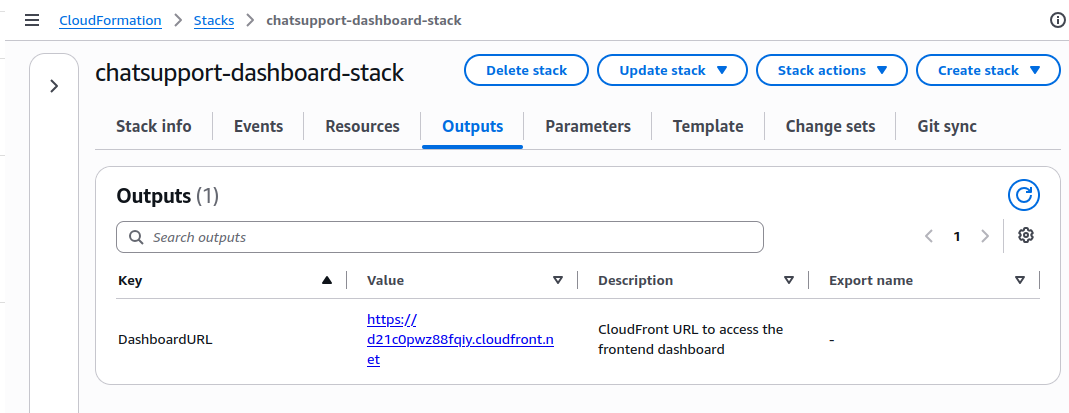
Once the upload is complete, go back to CloudFormation console and click the DashboardURL from the Outputs tab
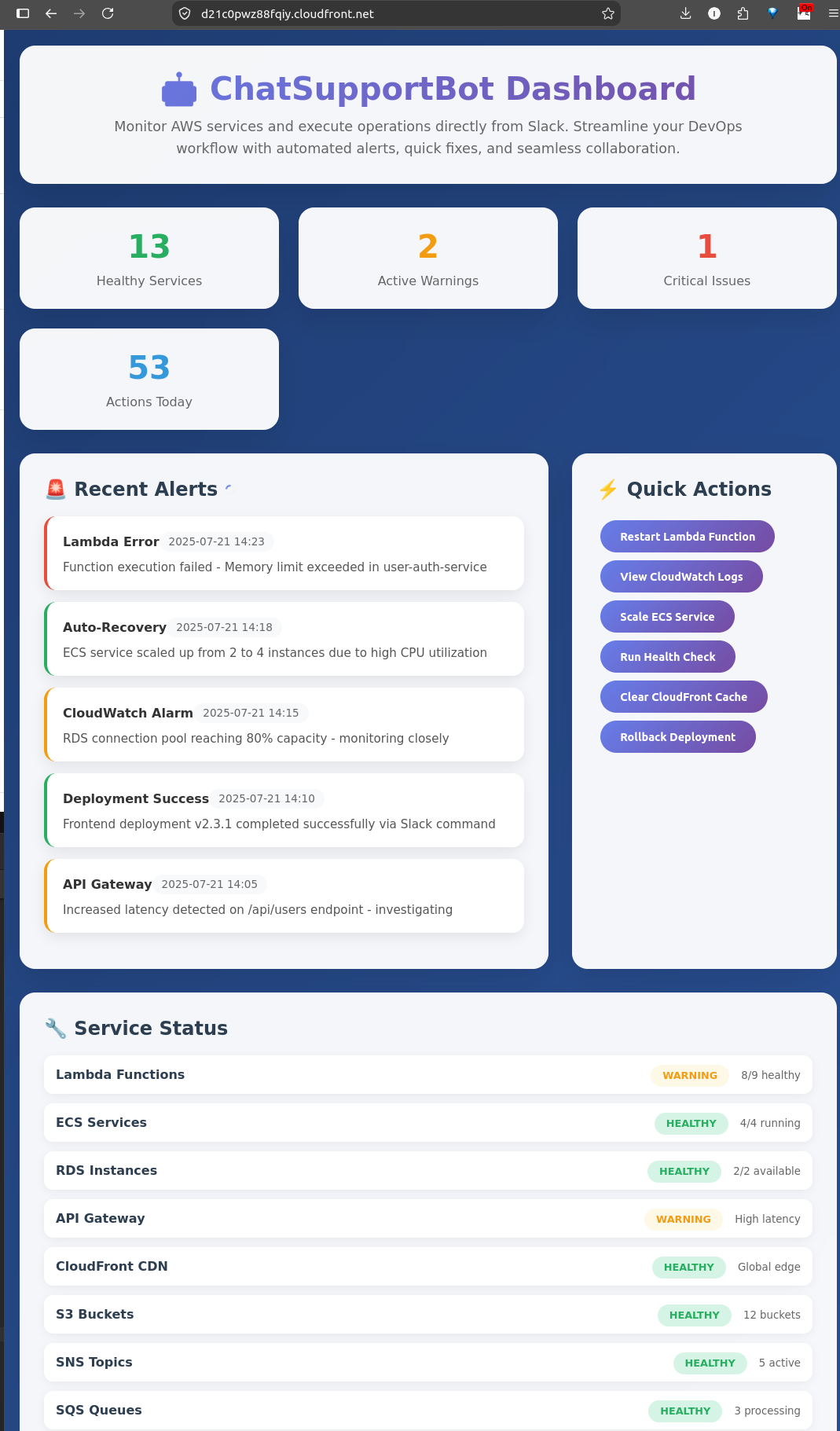
Then we shall see something like below
Project Conclusion
This project demonstrates how AWS can be used as part of the operational via tools like Slack / Teams and how AWS services can be integrated with its full functionalities in real-time scenarios.
Resource Clean-up
To avoid ongoing AWS charges, remember to delete what you created:
- Chatbot Setup
- Go to AWS Chatbot, remove the Slack channel configuration
- Go to AWS Chatbot, remove the Slack channel configuration
- IAM Role
- Head to IAM > Roles, find the awschatbot-role and delete it
- Head to IAM > Roles, find the awschatbot-role and delete it
- Cloudwatch
- Delete HighCPUAlert alarms
- Delete HighCPUAlert alarms
- EC2
- Terminate our EC2 instance which was used for the stress test
- Terminate our EC2 instance which was used for the stress test
- Lambda Functions
- Delete the RestartLambdaFn functions we created
- Also visit CloudWatch and clean up log groups in CloudWatch Logs (i.e: /aws/chatbot/ChatSupport)
- Frontend Dashboard
- Empty and delete the S3 bucket
- Disable and delete the CloudFront distribution
- S3 & CloudFormation Stack
- Go to S3 console, and empty the S3 bucket that was used to host the static index.html file
- If you used a stack to deploy resources, go to CloudFormation and delete it
- The stack deletion will also remove everything it has setup on CloudFront and S3