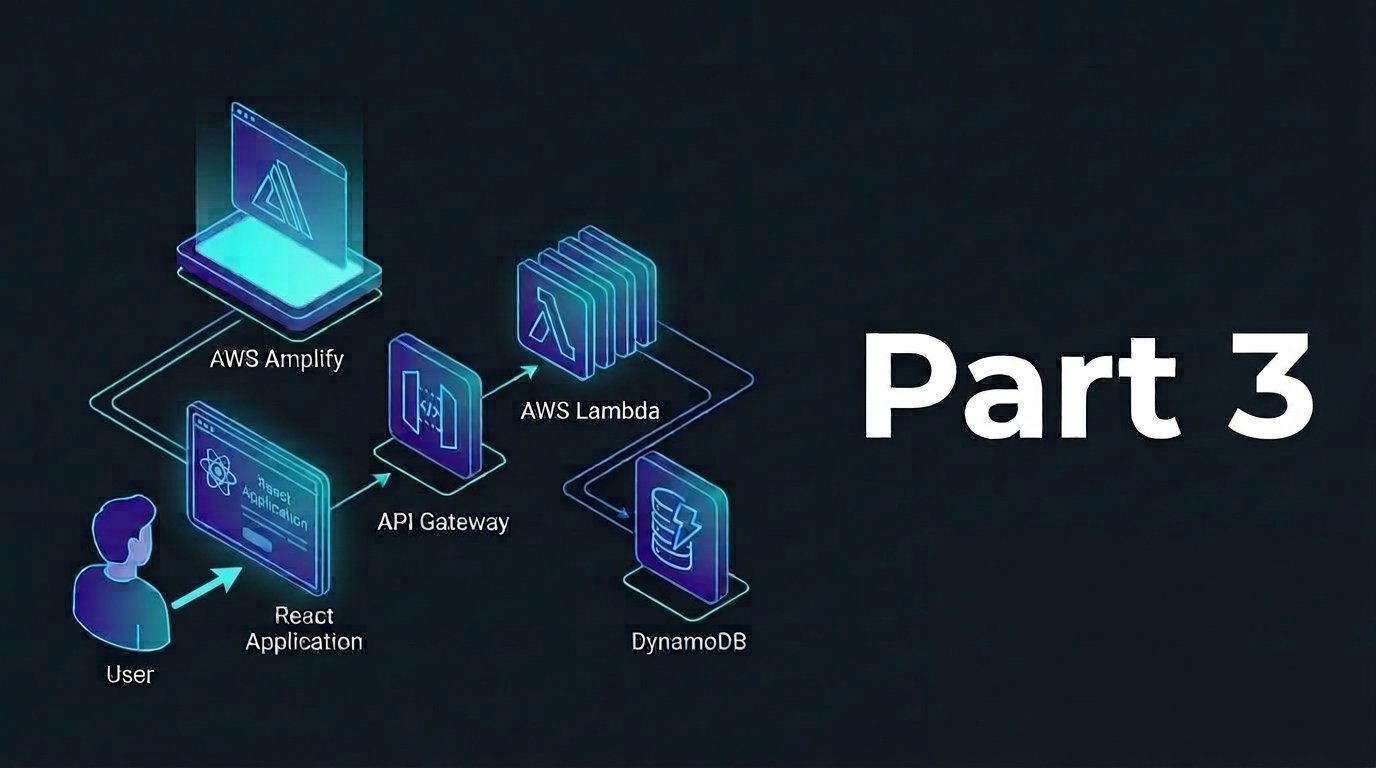
Now we are going to create the core components of our serverless application that consists of 2 parts: the Lambda layer and the Lambda functions. The purposes of using Lambda layers are to reduce package size as it share common dependencies across functions while being cacheable to avoid any redeployment.
Lambda layer is basically a ZIP archive that contains libraries and other function dependencies so it cna help the deployment lighter and reusable.
Step 1: Create Lambda Layer
- Go to Lambda console
- From side menu click Layers, click Create Layer
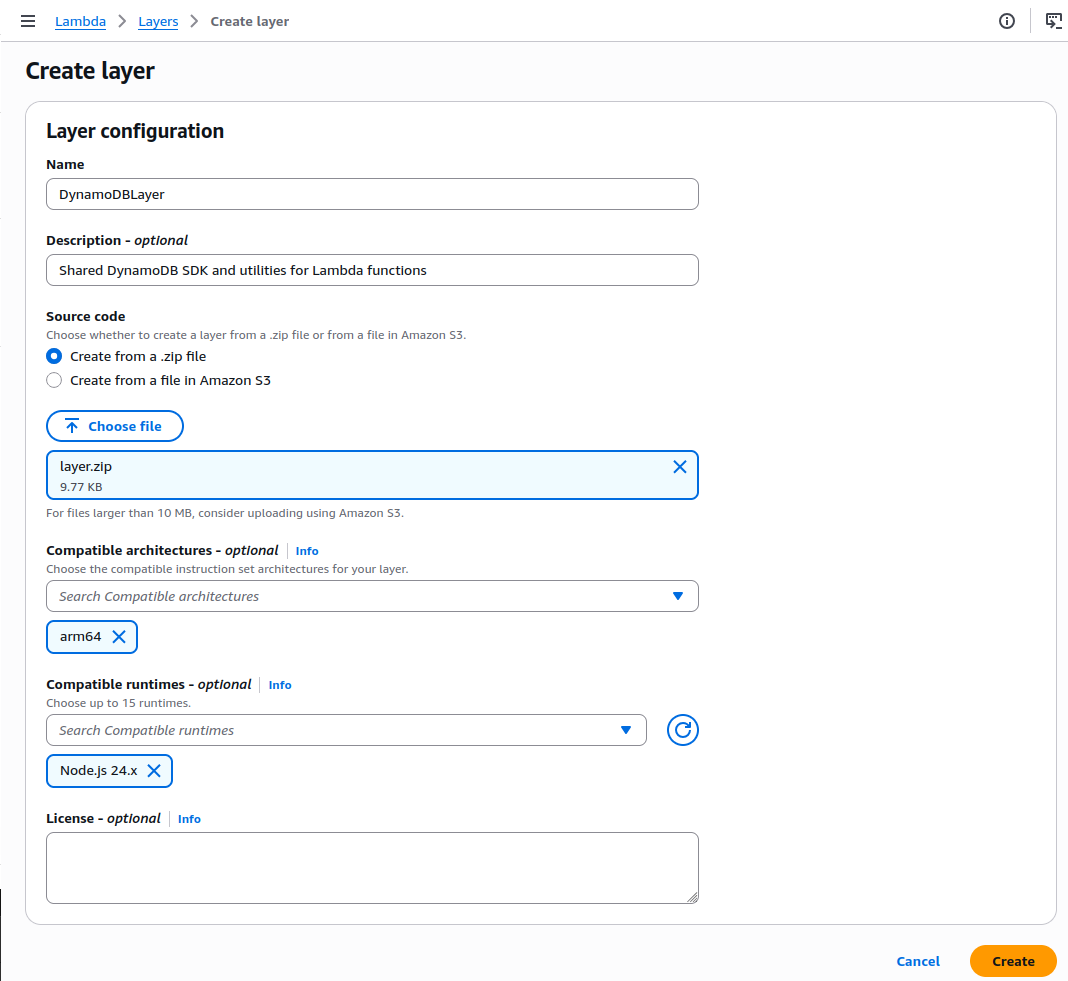
- Layer Configuration
- Name:
DynamoDBLayer - Description: “Shared DynamoDB SDK and utilities for Lambda functions”
- Upload Method: Upload ZIP file
- File: Upload this
layer.zip(contains Node.js DynamoDB dependencies)
- Name:
- Set Runtime Configuration
- Architecture: ARM64 (more cost-effective than x86)
- Compatible Runtime: Node.js 24.x
- Reason: ARM64 provides up to 34% better price performance
- Click Create
Step 2: Create Lambda Functions
We’ll create 4 Lambda functions: getProduct, addProduct, updateProduct, and deleteProduct. The reasons to split the functions into four is to ensure single responsibility with clarity of what it does and granular permission per operation that enhance security.
getProduct
This function handles the HTTP GET request and can return specific product or all products.
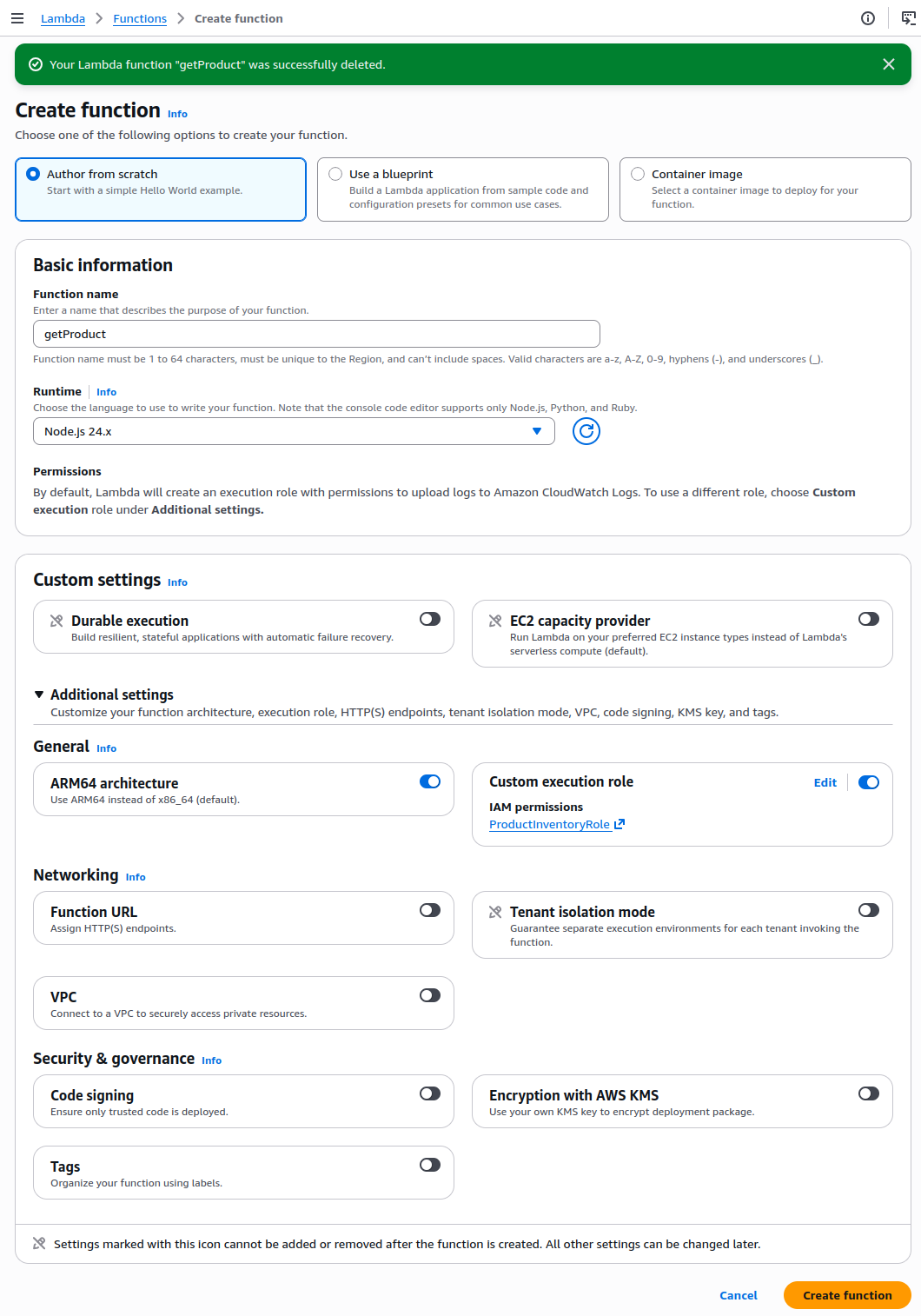
- Within Lambda console, go to Functions and click Create Function
- Option: Author from scratch
- Function Name:
getProduct - Runtime: Node.js 24.x
- Architecture: ARM64
- Custom Execution Role
- Select ProductInventoryRole (this one has DynamoDB permissions)
- Click Create Function
- Update Runtime Handler
- Update index.handler to index.getProduct
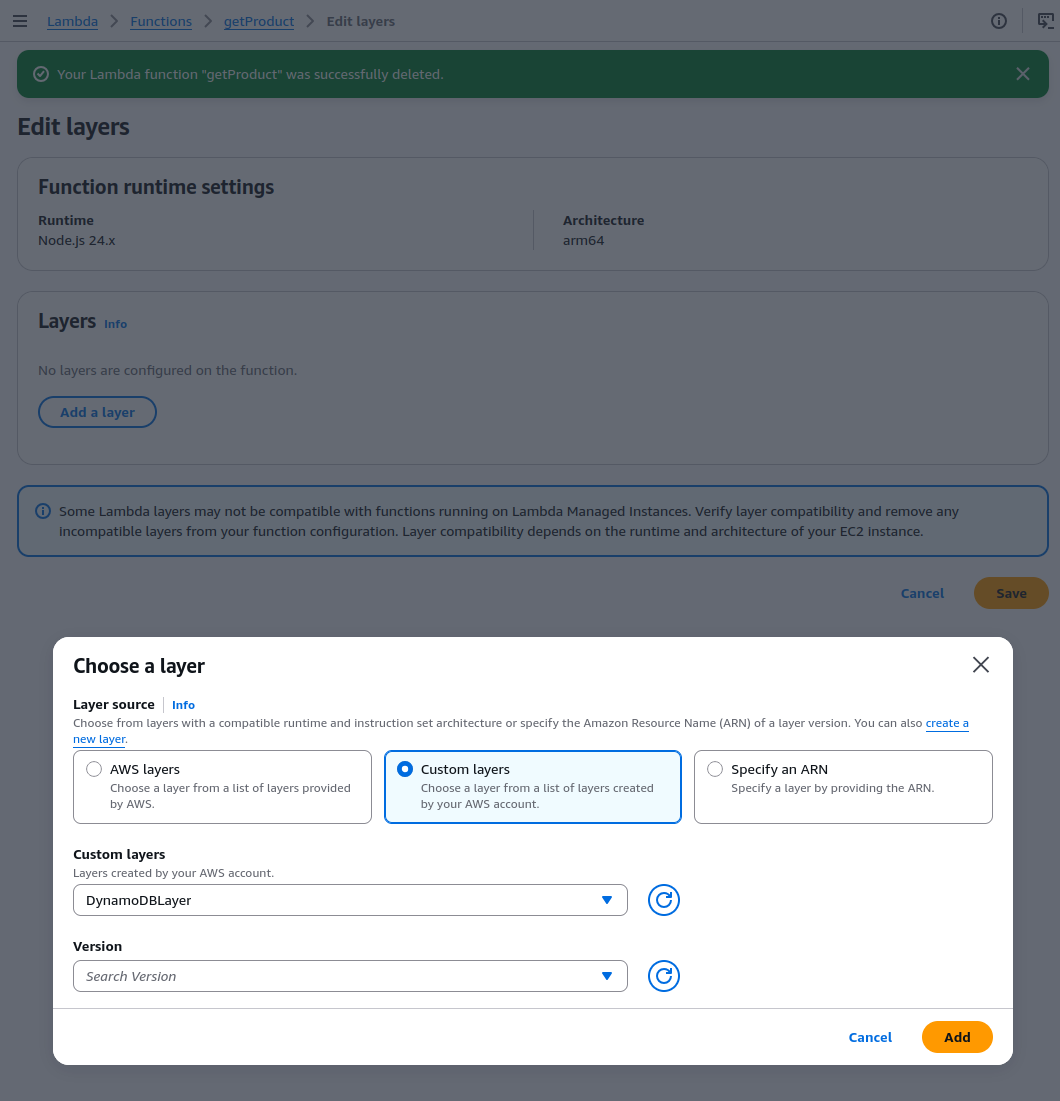
- Add layer
- Layer Source: Custom layer
- Layer: DynamoDBLayer
import { docClient, GetCommand, ScanCommand, createResponse } from '/opt/utils.mjs';


const tableName = process.env.tableName || "ProductInventory";


export const getProduct = async (event) => {
    const { pathParameters } = event;
    const { id } = pathParameters || {};


    try {
        let command;
        let isSingleItem = false;


        if (id) {
            isSingleItem = true;
            command = new GetCommand({
                TableName: tableName,
                Key: {
                    productIdId: id,
                },
            });
        } else {
            command = new ScanCommand({
                TableName: tableName,
            });
        }


        const response = await docClient.send(command);


        // 🔑 Map productId → id for frontend compatibility
        if (isSingleItem) {
            if (!response.Item) {
                return createResponse(404, { error: "Product is not found" });
            }


            const item = response.Item;
            return createResponse(200, {
                id: item.productId,
                name: item.name,
                price: item.price,
                available: item.available,
            });
        }


        const items = (response.Items || []).map(item => ({
            id: item.productId,
            name: item.name,
            price: item.price,
            available: item.available,
        }));


        return createResponse(200, items);


    } catch (err) {
        console.error("Error fetching data from DynamoDB:", err);
        return createResponse(500, { error: err.message });
    }
};
Click Deploy to save the code
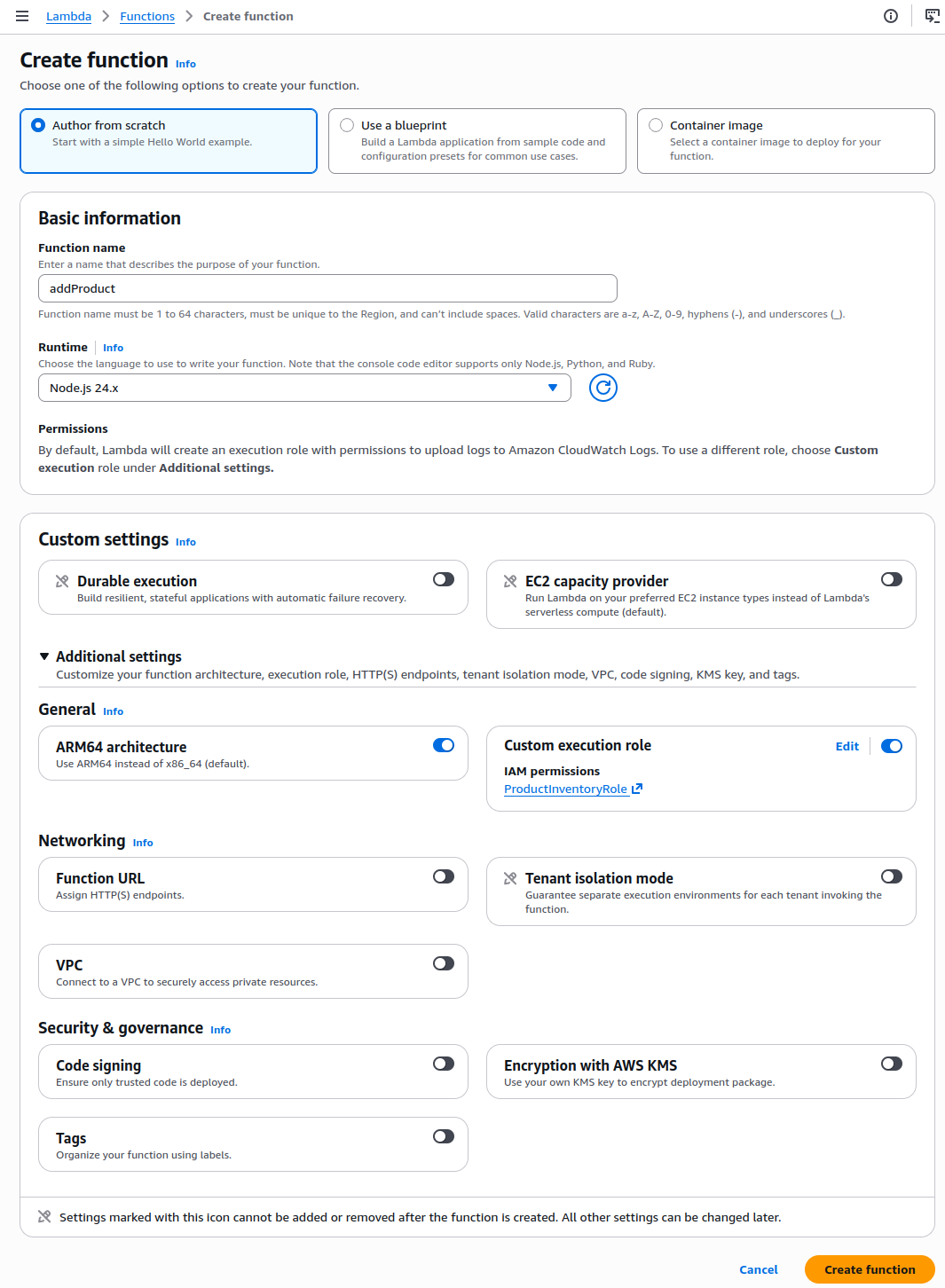
addProduct
This function is used to handle the HTTP POST request to create new product in our database. This function contains validation and error handling too
- Within Lambda console, go to Functions and click Create Function
- Option: Author from scratch
- Function Name:
addProduct - Runtime: Node.js 24.x
- Architecture: ARM64
- Custom Execution Role
- Select ProductInventoryRole (this one has DynamoDB permissions)
- Click Create Function
- Update Runtime Handler
- Update index.handler to index.addProduct
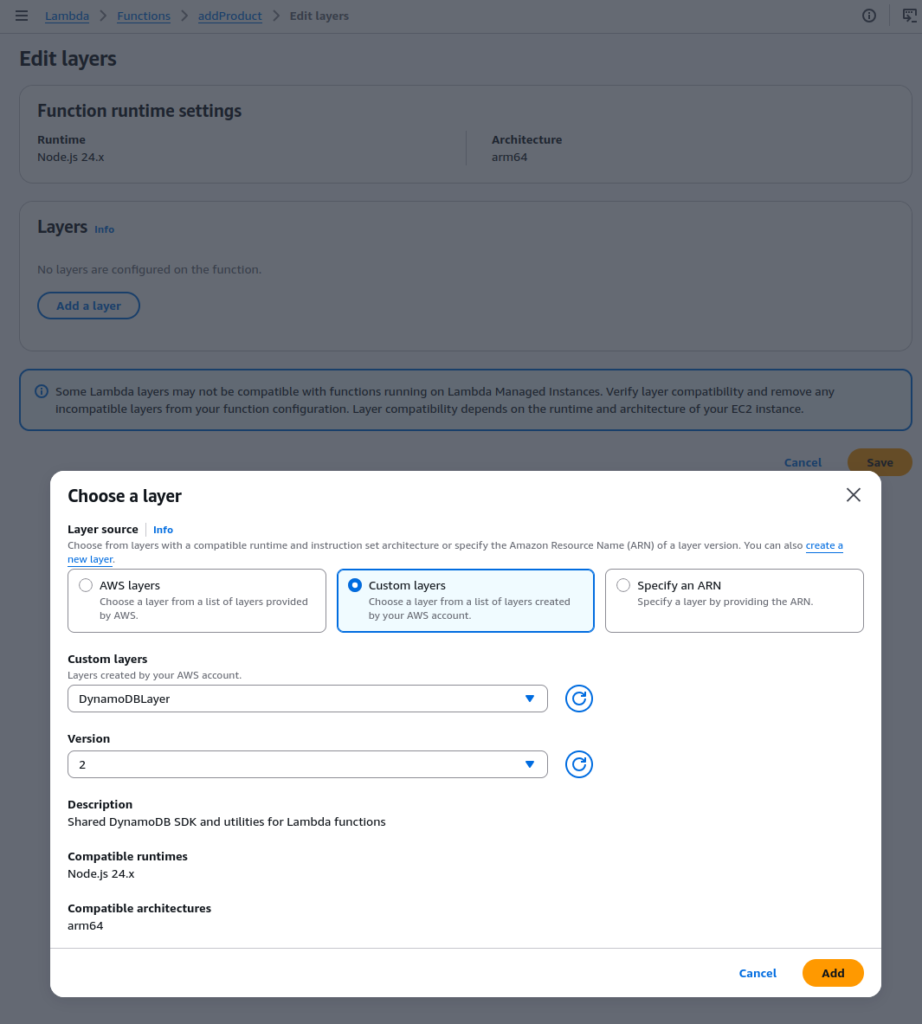
- Layer Source: Custom layer
- Layer Source: Custom layer
- Layer: DynamoDBLayer
import { docClient, PutCommand, createResponse } from '/opt/utils.mjs'; // Import from Layer

const tableName = process.env.tableName || "ProductInventory";

export const addProduct = async (event) => {
    const { body } = event;
    const { productId, name, price, available } = JSON.parse(body || "{}");

    console.log("valuies", productId, name, price, available);

    if (!productId || !name || !price || available === undefined) {
        return createResponse(409, { error: "Missing required attributes for the item: productId, name, price, or available." });
    }

    const command = new PutCommand({
        TableName: tableName,
        Item: {
            productId,
            name,
            price,
            available
        },
        ConditionExpression: "attribute_not_exists(productId)",
    });

    try {
        const response = await docClient.send(command);
        return createResponse(201, { message: "Product Created Successfully!", response });
    }
    catch (err) {
        if (err.message === "The conditional request failed")
            return createResponse(409, { error: "Product is already exists!" });
        else
            return createResponse(500, {
                error: "Internal Server Error!",
                message: err.message,
            });
    }

}
Click Deploy to save code
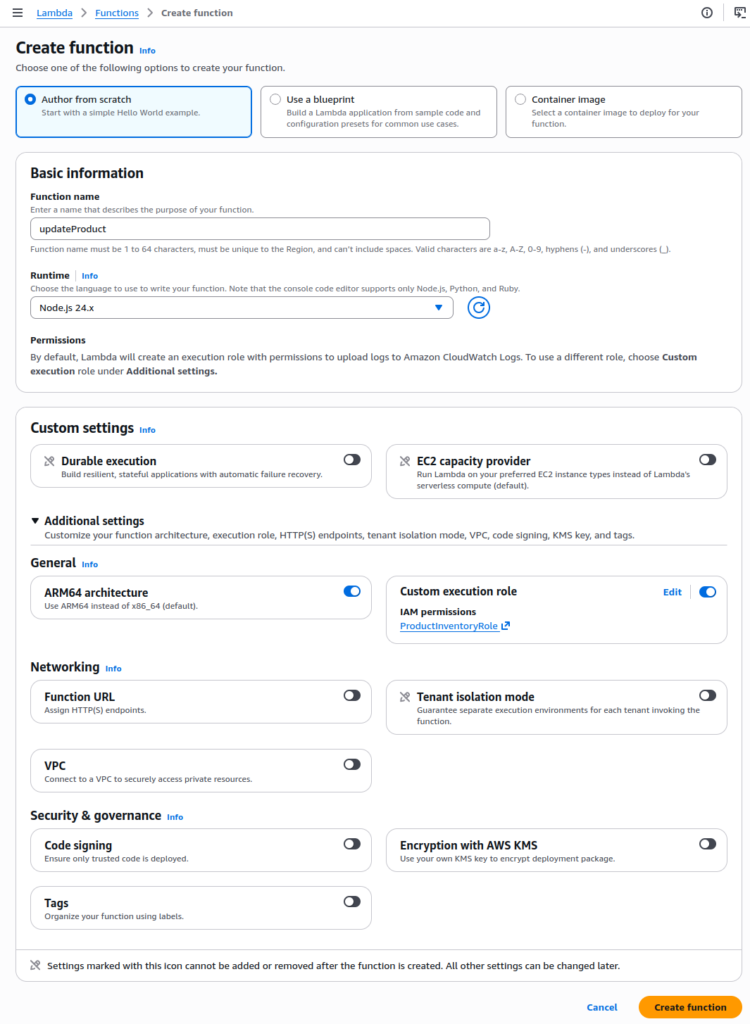
updateProduct
This function updates the product items in the database and handles HTTP PUT requests.
- Within Lambda console, go to Functions and click Create Function
- Option: Author from scratch
- Function Name:
updateProduct - Runtime: Node.js 24.x
- Architecture: ARM64
- Custom Execution Role
- Select ProductInventoryRole (this one has DynamoDB permissions)
- Click Create Function
- Update Runtime Handler
- Update index.handler to index.updateProduct
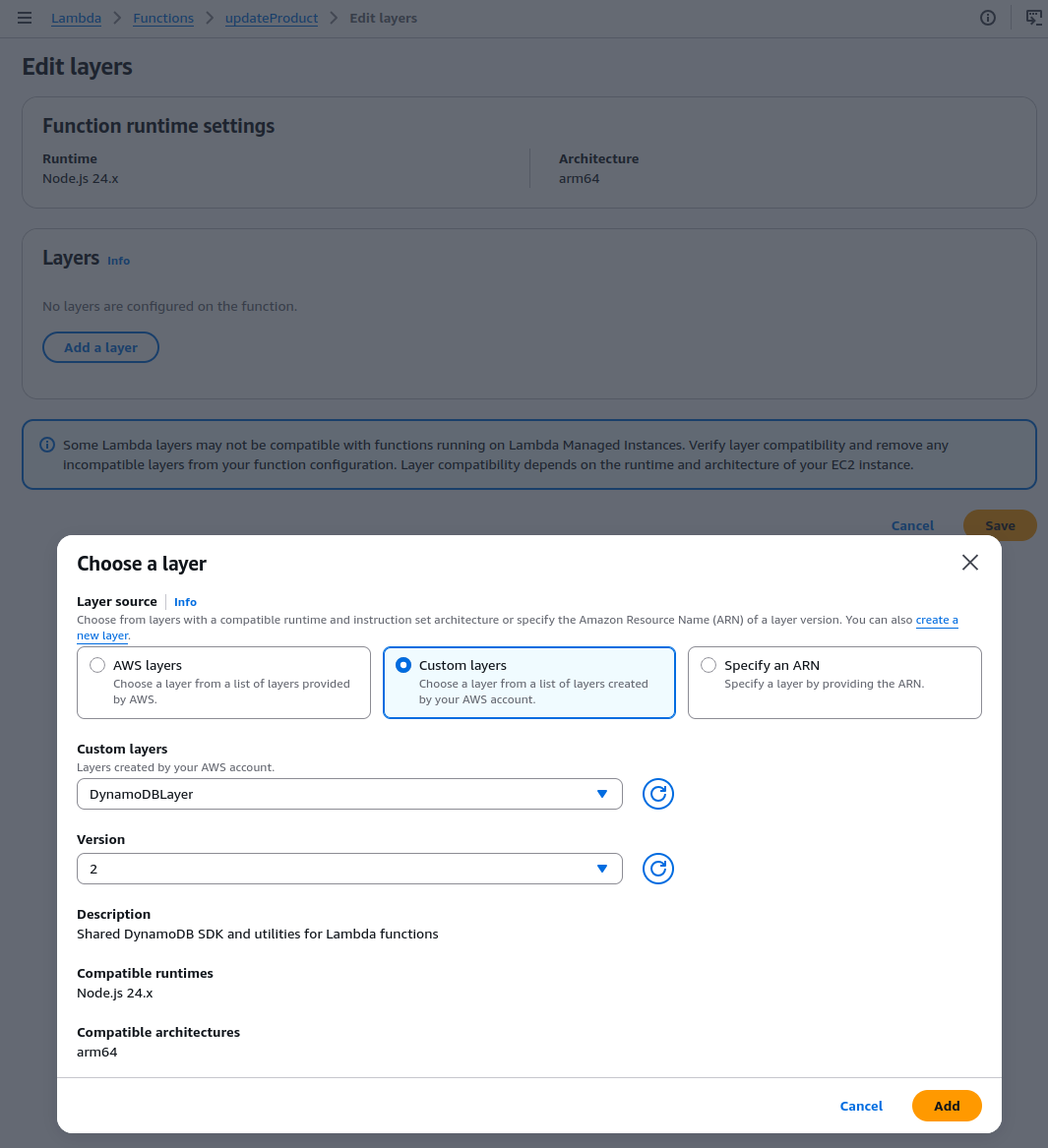
- Layer Source: Custom layer
- Layer Source: Custom layer
- Layer: DynamoDBLayer
import { docClient, UpdateCommand, createResponse } from '/opt/utils.mjs'; // Import from Layer

const tableName = process.env.tableName || "ProductInventory";

export const updateProduct = async (event) => {
    const { pathParameters, body } = event;

    const productId = pathParameters?.id;
    if (!productId)
        return createResponse(400, { error: "Missing productId" });

    const { name, price, available } = JSON.parse(body || "{}");
    if (!name && !price && available === undefined)
        return createResponse(400, { error: "Nothing to update!" })

    let updateExpression = SET  ${name ? "#name = :name, " : ""}${price ? "price = :price, " : ""}${available ? "available = :available, " : ""}.slice(0, -2);

    try {

        const command = new UpdateCommand({
            TableName: tableName,
            Key: {
                productId,
            },
            UpdateExpression: updateExpression,
            ...(name && {
                ExpressionAttributeNames: {
                    "#name": "name", // name is a reserved keyword in DynamoDB
                },
            }),
            ExpressionAttributeValues: {
                ...(name && { ":name": name }),
                ...(price && { ":price": price }),
                ...(available && { ":available": available }),
            },
            ReturnValues: "ALL_NEW", // returns updated value as response
            ConditionExpression: "attribute_exists(productId)", // ensures the item exists before updating
        });

        const response = await docClient.send(command);
        console.log(response);
        return response;

    }
    catch (err) {
        if (err.message === "The conditional request failed")
            return createResponse(404, { error: "Product does not exists!" });
        return createResponse(500, {
            error: "Internal Server Error!",
            message: err.message,
        });
    }
}
Click Deploy to save code
deleteProduct
This function handles the HTTP DELETE request and removes product records from DynamoDB table with validation check.
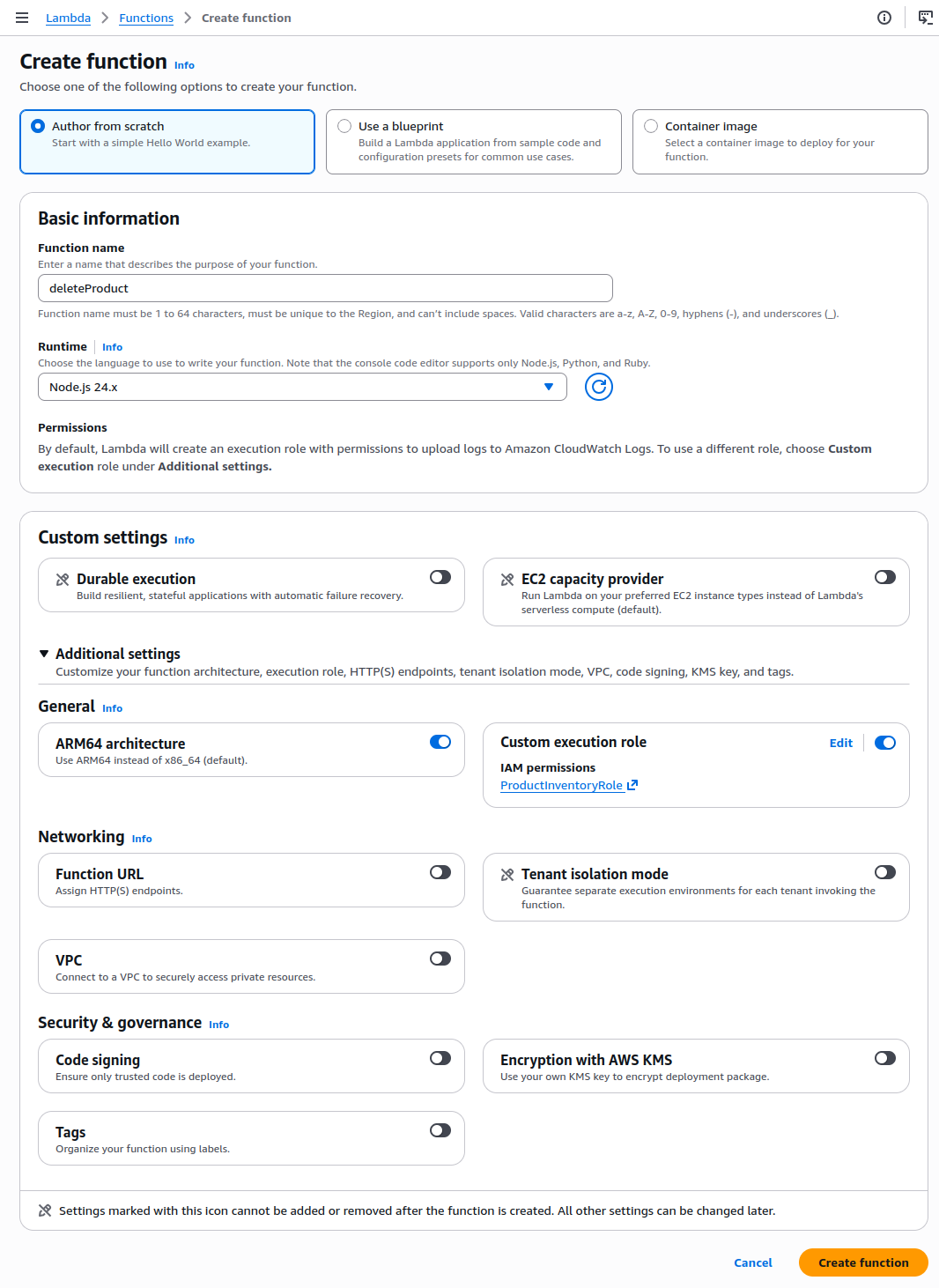
- Within Lambda console, go to Functions and click Create Function
- Option: Author from scratch
- Function Name:
deleteProduct - Runtime: Node.js 24.x
- Architecture: ARM64
- Custom Execution Role
- Select ProductInventoryRole (this one has DynamoDB permissions)
- Click Create Function
- Update Runtime Handler
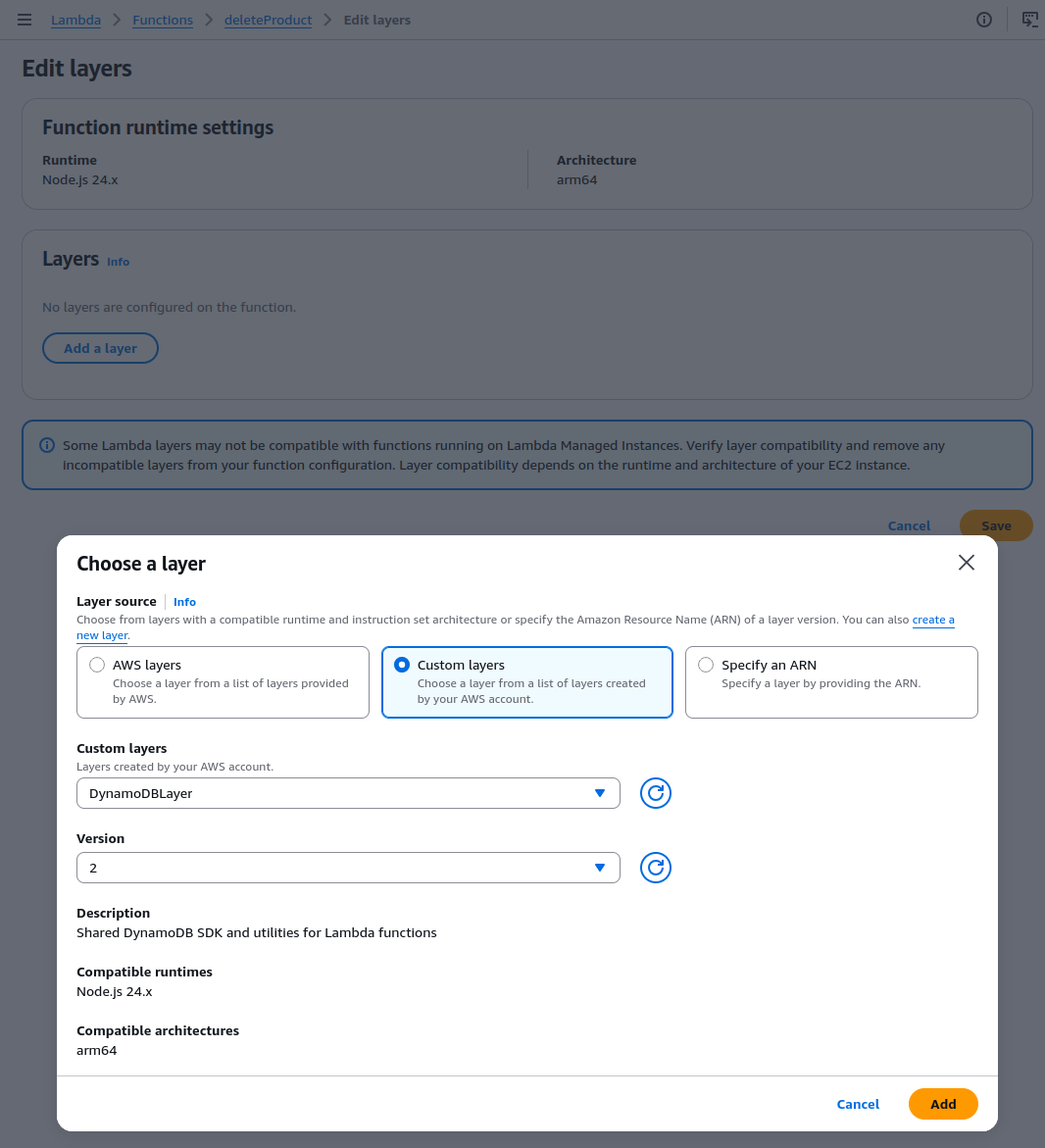
- Update index.handler to index.deleteProduct
- Layer Source: Custom layer
- Layer Source: Custom layer
- Layer: DynamoDBLayer
import { docClient, DeleteCommand, createResponse } from '/opt/utils.mjs'; // Import from Layer

const tableName = process.env.tableName || "ProductInventory";

export const deleteProduct = async (event) => {
    const { pathParameters } = event;
    const productId = pathParameters?.id;
    if (!productId)
        return createResponse(400, { error: "Missing productId" });

    try {
        const command = new DeleteCommand({
            TableName: tableName,
            Key: {
                productId,
            },
            ReturnValues: "ALL_OLD", // returns deleted value as response
            ConditionExpression: "attribute_exists(productId)", // ensures the item exists before deleting
        });

        const response = await docClient.send(command);
        return createResponse(200, { message: "Product Deleted Successfully!", response });
    }
    catch (err) {
        if (err.message === "The conditional request failed")
            return createResponse(404, { error: "Product does not exists!" });
        return createResponse(500, {
            error: "Internal Server Error!",
            message: err.message,
        });
    }
}
Click Deploy to save code
Summary
In this part we have developed 4 Lambda functions with 1 Lambda layer that can handle the HTTP requests that represent our REST API. All of these functions are configured with IAM roles that has sufficient to be assumed to use and interact with DynamoDB.
In the next part, we will create the API gateway to expose these 4 Lambda functions as REST APIs so it can be securely accessed by other application to interact with the backend.